 Elphamatt
Order now:
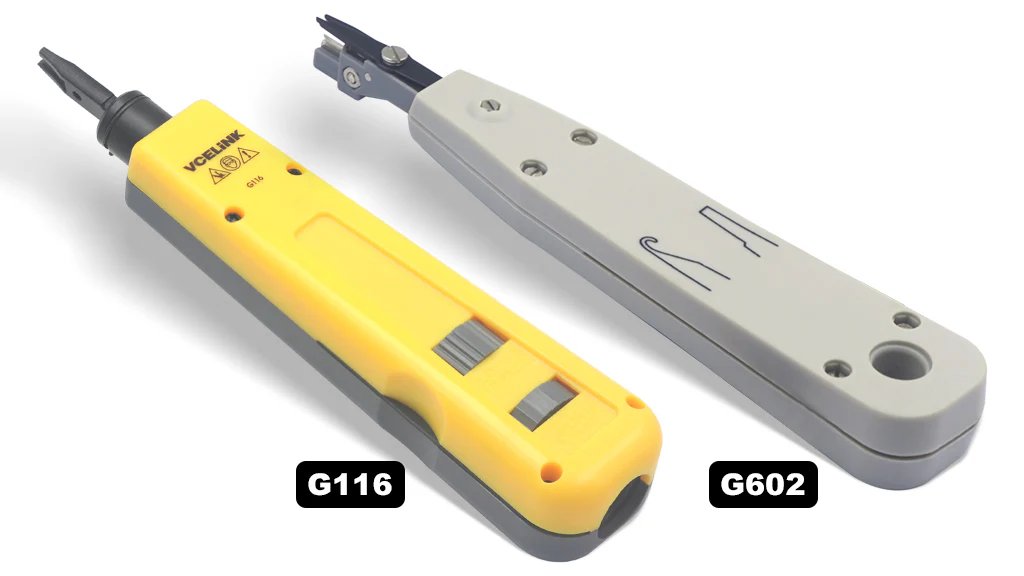
A punch‑down tool (also called a punch‑down insertion tool, IDC tool, or sometimes a “Krone tool”) is a specialized hand tool used by network and telecommunications installers. It is designed to terminate wires into insulation‑displacement connectors (IDCs) on:
Patch panels
Keystone jacks
Punch‑down blocks (66, 110, Krone/LSA‑PLUS)
Surface mount boxes
When the tool is pressed onto a wire already placed in a slotted post, a spring (in impact models) drives the blade to seat the wire into the connector, and often simultaneously trims the excess wire. Wikipedia+1
Here are some typical features you’ll see in a good punch‑down tool:
Impact mechanism: Many models have an internal spring or impact trigger which delivers a consistent force, making seating wires faster and more reliable. Techyshop Kenya+1
Interchangeable/removable blades: Because different IDC blocks (110, 66, Krone) use different blade shapes, many tools allow blade changes. Wiltronics
Dual‑function blade (seat + cut): Some blades both seat the wire and trim the excess in one motion. Others only seat the wire and require separate trimming. Wikipedia+1
Adjustable impact force: For different cable types/blocks, some tools offer “low” and “high” impact settings. dlink-me.com
Ergonomic handle: Non‑slip grip, comfortable for longer use, especially in high‑volume installs. STPlus
Blade storage: Many include a compartment in the handle for spare blades. IT Bazar
Strip the cable (if needed), arrange the conductors and insert them into the IDC slots of the connector (patch panel, keystone, block).
Position the punch‑down tool blade over the wire and the IDC slot.
Press down until the tool’s spring releases (in an impact model) or until the wire is fully seated. At that moment:
The IDC slot’s metal blades slice through the insulation and make contact with the conductor.
If the blade has a cutting edge, the excess wire is trimmed off flush. Wikipedia+1
Release the tool. If the tool is designed for cable type, the termination is done; move on to the next conductor.
Terminating Ethernet (Cat5e, Cat6, Cat6A) cables into patch panels or keystone jacks.
Terminating telephone wiring into 66 or 110 blocks in telecom closets.
Structured cabling installations in offices, data centres, schools, etc.
Retrofitting existing installations or deploying new outlets requiring clean, reliable terminations.
When choosing or using a punch‐down tool, keep the following in mind:
Connector type compatibility: Make sure the tool supports the IDC style you are working with (110, 66, Krone, etc). Using the wrong blade can result in poor contacts. Reddit
Blade function: Decide whether you need seating + cutting all in one, or if you will cut separately. Some modules/jacks may require special blade configurations.
Impact setting / quality: A tool that allows adjustable impact is helpful when working with different cable densities or materials. Lower‑force may be needed for delicate connectors.
Ergonomics & durability: If you will perform many terminations, handle grip, tool weight, and durability matter. Cheap tools may fatigue you quickly.
Spare blades & maintenance: Blades dull over time, especially the trimming edge; ensure the tool allows blade replacement.
Cable category & future‑proofing: If you are terminating high‑performance cables (Cat6A, 10G), ensure your terminations are done properly — even with the best tool, the overall link quality still depends on cable, jack, termination practices.
Correct technique: Some installations fail not because of the tool, but incorrect use — e.g., wire not fully seated, unwound too far, wrong blade orientation. For example:
“Make sure the correct blade orientation is used; one end trims the outside, if you set it wrong you can cut the conductor.” Reddit
Cost vs volume: For occasional use you may not need the top‑tier tool; for high volume / professional installations investing in a good brand pays off.
Safety / training: Even though punching wires is low‑voltage work, ensuring clean terminations and avoiding damage to connectors comes with some care.

FLYINGVOICE IP PHONES
Ksh 6200.0

FLYINGVOICE IP PHONES
Ksh 8200.0

FLYINGVOICE IP PHONES
Ksh 6400.0

FLYINGVOICE IP PHONES
Ksh 10400.0
Page 10/17